Showing posts with label naming. Show all posts

Saturday, January 10, 2015

Android and iOS app: Constant Therapy

Constant Therapy App
Apps: iPad Constant Therapy app on iTunes (free)
Android Constant Therapy app on Google Play (free)
Website: constanttherapy.com

What it is: A Speech Therapy tool for Cognitive-Communicative rehab. The app includes a large variety of language and cognitive tasks that can be customized to complexity level of your clients. It is free for clinicians, researchers and students; clients have to buy a subscription.

Here is how it works: As a clinician you would have this app on your device (again, for you an account is free). When you have a client with cog-com goals, you would create an account for them on your device (this is all still free). You would choose appropriate tasks customized to your client's diagnosis and severity, functional needs and skills.

The variety of their tasks is extremely satisfying. For language they have tasks for auditory compr, naming, writing, reading and sentence planning; for cognition they have attention, visual processing, mental flexibility, memory, problem solving and executive skill tasks. This list does not do justice to the variety and creativity of these tasks. I'm not sure the exact number but I counted 34 language tasks and 31 cognition tasks. To get a better idea very quickly, I urge you to hop over to this page and just glance at these tasks (when you mouse-over any task, it shows you a screen shot): http://constanttherapy.com/constant-therapy-tasks.

In Tx: The program allows you to select which tasks to use with your client, and at the level of each task you can adjust the complexity. You then get a baseline for each task for the individual client, and the program continues to keep track of progress (as well as usage). There's too many activities that address a large variety of goals to go into detail here. What I can say is that the activities I've seen and tried are created almost exactly how I would have conceptualized them, and I found it was very intuitive how to explain the clinical justification for spending time on these to patients and their families. Also, CT's website discusses Evidence Based Practice (EBP) implementation.

Outside Tx: You can select the tasks you want as "homework" for your client. This is where their own subscription becomes beneficial: The clients that can continue to complete these tasks outside of the therapy session can purchase a subscription (http://constanttherapy.com/pricing). They should do it using the account you create for them in session, so that the homework you assign can show up in their account, and their progress with tasks in sessions and on their own can be tracked (from within the account of the clinician that originally created their login). This extends your therapy outside the session: you, the SLP, are making clinically-informed choices re which tasks are most appropriate and beneficial, and are able to modify your decision based on progress feedback. Very few tools allow this kind of flexibility for clinicians to address patient needs beyond the therapy session.

My experience: I've used it only with adults for both cognitive and language intervention. I found it extremely age-appropriate, interesting and motivating. My clients seemed to enjoy the tasks, and I can't say enough about the ability to track progress in such an individualized (per client, per goal, per task) manner. A few outpatients have purchased a subscription and they (and their spouses) report good motivation to work on tasks at home.

Bottom line: I can absolutely recommend this program/service to both clinicians and clients. For the clinician, you will find this to be one of your most used apps on your tablet. For the client, based on the prices in 2014-2015 the feedback I've received is that it is well worth it.

Sunday, July 27, 2014

iOS App: ICOON Global Picture Dictionary

ICOON App
ICOON App on iTunes ($0.99, sometimes Free)

What it is: Aimed at travelers ICOON provides a pictorial phrase book for the purpose of cross-language communication. It is simple to use and includes 12 categories that range from the basic/every-day (Hygiene, Health, Clothing, Food) to the travel-related (Measurements, World and Accommodation).

Screen Shot 1 shows a view of the categories, which is on the first screen of this app. Screen Shot 2 shows the view from inside a category ("Hygiene"), and Screen Shot 3 a specific item (toothbrush and toothpaste from the "Hygiene" category).
Screen Shot 1

How we can use it in Tx: When it comes to language goals,
pictures are always useful. Pictures divided into relevant categories are even more useful as one can make decisions about complexity level of vocabulary tasks based on context.

For word-finding goals, vocabulary that is relevant to the immediate environment of your client or is basic for their ADLs (e.g., food, hygiene, clothing) would be easiest. Emotions and Leisure a little more difficult, and Travel and World categories likely most
complex.

Language goals can be addressed in a variety of ways including confrontational naming, categorizing (top-down starting with the category and thinking of items then going over them, or bottom-up starting with items and determining categories). Pictures can replace word lists for motor speech and intelligibility practice. The picture lists easily lend themselves to various Q/A tasks, from simplest y/n to more open ended.

Screen Shot 2
The app could also be used to assess appropriateness of AAC using pictures. Does your client recognize the pictures? Are they able to read the category names? Their AAC needs are not likely to be fully met with this app (unless there is no symbolic dysfunction, and your client is only limited d/t voice issues) but you will be able to assess needs and abilities to determine what AAC app WOULD work if any.

Goals we can target in Tx with this app: Language goals
including word-finding, categorizing, question/answer and descriptions, speech goals that address dysarthria, apraxia and anything that affects intelligibility, and AAC (specifically to help assess needs and appropriateness).

Some specific examples:

Screen Shot 3
1. I recently had a client who has an existing Dx of severe expressive aphasia as well as a Dx for severe dementia. I have been working with her on pictures, and she is now able to generate around 30% (on a good day) of simple vocab from pictures. I show her a picture and ask what it is. I try to keep the pictures for each session from within the same category to help with context. If she is not able to generate the word, I give her a choice ("is this a toothbrush or a comb?"). She is able to reply with >90% accuracy. When we started she had <50% acc just repeating words. Her ability to express her needs has increased, and I have been able to educate staff re strategies to communicate with her (to ask her y/n questions as she demonstrates fairly high accuracy answering these).

2. S/P stroke client with expression limited to yes and no and conflicting reports of accuracy re same. These every day vocab pictures were useful in determining the severity of his symbolic dysfunction and helped determine that he is appropriate for an AAC device, and is able to navigate across categories to find his needs.

3. Used this app for a short task in a session with a high functioning language client presenting with mild word-finding issues at conversation level. This app was used to provide stim to jump-start conversations on a variety of topics.

Saturday, September 14, 2013

Android, Windows and iOS app: 4 Pics 1 Word

4 Pics 1 Word App
4 Pics 1 Word for Windows RT, for Android devices on Google Play, and for iOS devices from iTunes (all are free at this time). Also available for Nook from Barnes and Noble, and for Kindle from Amazon (these cost $0.99, and possibly are from a different developer).

What it is: A simple puzzle that presents 4 pictures that have one word in common, and you have to guess what that word is. See screen shot below where the target word is "sweet".

The gameplay is simple. Just start it and it presents 4 pictures on the screen (beautiful and high resolution), 12 letters, and blanks for each letter of the target word. Figure out what word the 4 pictures have in common and fill in the answer. You can turn off the sound if you want (although it's not annoying, just sound effects for when you select letters) and you can turn off the notifications re "buying" hints and such. As you progress through the puzzle, you win "coins" with each correct answer, and then you can purchase hints with these coins. Players can also buy these "coins" via in-app purchase.

How we can use it in Tx: Solve the puzzles with your client, providing cues as needed. You can talk about each picture of the 4 presented per puzzle, ask questions and elicit replies. In many cases the target word has more than one meaning (e.g., "sign" where it could be a noun or a verb) which provides context for some great language intervention. Solving the puzzles is great, but the path to solving each puzzles provides context for some useful interaction.

The main problem with this app is that you can't go back to puzzles you've solved (unless you remove the app and reinstall it, presumably). The puzzles do get progressively more difficult but very gradually and not by much. It's not optimal but for now you can use it until it's too difficult for your population, then reinstall and start from the beginning. And hopefully down the road, there will be a setting to go back to solved puzzles/restart the progress. On the other hand, it's free so expectations for greater customization are rather low.

Goals we can target in Tx with this app: Language goals that involve word-finding and naming are addressed rather straightforwardly, but there's also good use of repetition and Q/A that can be useful in addressing apraxia and dysarthria goals. Describing and discussing the 4 pictures presents a great opportunity to practice verbal expression. Reasoning is addressed with solving the puzzles, and focus/attention can be addressed as well (presenting 4 different pictures to solve for one word would require some cuing for focus for quite a few of my current clients). A client with lateral neglect may benefit from having to give equal attention to all 4 pictures to solve the puzzle. And you can always address memory goals with recall of pictures.

Some specific examples: Just a couple of examples of the less straightforward uses of the puzzle.

1. Memory goals: after discussing each of the 4 pictures and, hopefully, solving the puzzle, turn off the device and recall the 4 images. Start by cuing with the common word, then provide additional cues as needed.

2. Homographs/homonyms: address the various meanings of the target words as they come up in the puzzle. Since it will be as part of the puzzle-solving activity, and since the differing meanings of the words are in most cases what make the puzzle (e.g., in the screen shot above the actual taste of something vs. a synonym for "cute"), you'll have a great opportunity for this type of activity in  context (rather than a rote list of words as part of a structured task).

Sunday, May 26, 2013

iPad app: Move & Match

Move & Match App
Move & Match app on iTunes (US $1.99)

What it is: Listed in the "Education" category, this app lets you create elements on a background and move them around freely. Elements can only be rectangular, but they can hold photos/pictures or words, they can be custom sized (as can the text within), they have a variety of background colors, and they can be cloned. If this description doesn't do much for your imagination, look at the screen images of examples I threw together really quickly (or look at the developers' examples of uses in iTunes via the link above).

Within the app you make a project file for each exercise that you create, and hence can build yourself a nice database of go-to tasks for a variety of goals. The developers also have a selection of pre-created projects that you can download off Dropbox directly into the app and use (this is accessible via the "i" information screen within the app).

Screen Image 1: Closed paragraph
How we can use it in Tx: This app allows easy creation of a host of closed-exercises that require either filling in the blank from provided choices (like in Screen Image 1), multiple choice answers, any kind of matching, or word/sentence building. For cogn goals you can create sequencing and sorting tasks. If you take the time you can build some useful visuospatial/executive function tasks such as completing a pattern or an analogy (you'd need to create some images externally--via an image editor and then get the pictures on your iPad first). I discuss some of these suggestions in the "specific examples" section below. But really, the possibilities are endless... just about anything you do with worksheets that involves multiple choice can be replicated and expanded on using this app!

Goals we can target in Tx with this app: Language and word finding goals through a variety of fill-in-blank, closed paragraph, matching, word/sentence building or multiple choice tasks. Higher level cogn goals like planning, sequencing and reasoning. Sequencing and sorting either words, numbers or images (e.g., photographs of various stages of some activity, just like photo sorting cards but all in one screen). You can make simple math problems with multiple choice answers (there's actually a few of these ready-made and freely available from the developers already). You can create a background monthly calendar with fill-in elements to work on orientation and recall.

Screen Image 2: Sequencing photos and/or text
Some specific examples:

1. Sequencing/sorting: As I mention above, you can take photos of various stages of an activity (e.g., doing laundry, heating up a pizza, making ice cubes, etc.). You can import pictures from your album which means you can use your camera or do image searches online, save them to album, and use them from album. Once you have enough steps to sequence you just let the client move them around into the correct order. You can also make text elements to sort or sequence (e.g., months, numbers, days of the week, or steps of an activity listed in text instead of as photos). See Screen Image 2 of a quick and dirty example where I use photos I took for another app I reviewed recently, but also added text that can be moved and reordered.

2. For language goals you can create just about any matching exercise you can come up with. Antonyms, synonyms, definitions, pictures of items and their names... etc.

Screen Image 3: Categorizing text and/or images
3. Categorizing task: create a few headings (e.g., furniture, food, countries, etc.) and a bunch of words or images that fit in each of these and have your client drag the words around to place them under the appropriate category name. See Screen Image 3 for a quick and dirty example I made for this task. The images I just downloaded after a very quick google search, and, you can see at the bottom of the screen the elements waiting to be sorted.

4. Scanning activity: create a whole bunch of elements (icons or words or letters or numbers or even just squares with colors) and direct your client to find (and, for example, move to a specific side of the screen) all the elements that fit some set of criteria (e.g., all the blue squares, or all the blue squares with "r").

Screen Image 4: Calendar
5. Orientation/recall: use an image of a calendar (in my example in Screen Image 4 I used a weekly view of the iPad Calendar that was blank) and add some elements that can be moved around (visitors, routines like therapy and meals, etc.). Work on today, or recall yesterday. I like the weekly view for this because it has all this room to hold the collection of elements while the client decides if to use them and where to put them in the daily list.

There's just too many things you can do with this app to list them all... Since these projects can be saved and shared, maybe if there's enough SLPs using this app we can have our own section on the developer's Dropbox down the road... or find some other way to share amongst ourselves. I know I plan to create a whole load of projects in this app, and although some may take great time and effort, I know I'll use them a lot.

Friday, July 20, 2012

iPhone app: Oh, My Word! 2

Oh My Word! 2 App
OhMyWord2 app in iTunes (free)

What it is: Dubbed a prettier and more interesting version of hangman, this is a game where you guess a common 5 letter word based on being given two words that would flank it if listed in alphabetical order. You enter a 5 letter word as your guess, and if it's not the target word, your guess replaces one of the flanking clue words, getting you closer to the target. For example in the screen image below, the target word if listed alphabetically would be between GYROS and OFFER. So the hidden word must start with G, H, I, J, K, L, M, N or O. Put in a few guesses of words starting with these letters, and you narrow it down to a word that in alphabetic order would be between LIMPS and LINKS and must therefore start with LI- (see screen image 2, below).

Screen Image 1
There are several levels at which this game can be played, including a relaxed (called "classic") un-timed easy level where you are given 50 guesses, and the goal is to see how many words you can find within that number of guesses. There's also hints where you can request to be shown one of the letters in the hidden word. After playing this game several times (ok, a whole lot of times... this is a fun game!) I can attest to the fact that the target words indeed are common.

How we can use it in Tx: Access to an un-timed level with truly common words makes this a useful Tx tool. Definitions do not enter into the game. It is more about word recognition and letter sequencing in alphabetic order. Word-finding in the traditional sense normally involves coming up with the word for a specific item, and as such the definition is an integral part. Coming up with words that start with a specific letter (or sequence of letters) is a skill that combines language and reasoning, but still relies on word familiarity and ability to access stored words. For my acute pts with Aphasia I developed a mini word recognition game: I would put two cards with consonants in front of a pt, for example "p" and "g" and then give them cards with all 5 vowels, and ask them to choose the vowels that would form a real word if placed between the the two consonants; so in this example 'e' (peg), 'i' (pig), and 'u' (pug). And I'd ask the pt to also tell me what each word means (often they would choose a vowel that does not make a word, and realize so when they couldn't come up with a definition). It was a multi-step simple word finding activity that first required to recognize the word, then access its meaning. In the same manner for this app, since the words are common, supplemental tasks involving word meanings can be incorporated for those pts who need it.
Screen Image 2

Goals we can target with this app: Word-finding and naming, language, reasoning, sequencing (since alphabetical order plays a large role in this game), question/answer goals (simple y/n where you ask the pt if this letter comes before that one, or if this word precedes or follows the other in the dictionary). For verbal expression deficits reading the words aloud could also be added, incorporating apraxia, dysarthria, voice, intelligibility goals as part of a fun activity.

Some specific examples:

1. For a pt working on using intelligibility strategies at word-level, this game can provide a nice set of short words to practice strategies on. Many of the words have consonant clusters, which provide great practice for exaggerating movements. And since this is a fun thinking activity, it is easier to gauge level of cuing needed to use the intelligibility strategies at word-level (since usually, a word-level task involves a rote list of words and the drill-like manner of the exercise often reminds the pt to use strategies; not that it's a bad thing to have this built-in reminder--in fact it is a great way to get the strategies practiced--but it's nice to have a halfway point where the exercise is still word-level, but the focus is elsewhere and strategy use is less in the forefront of one's mind.

2. For a pt with sequencing goals, this game is a great practice involving alphabetic order. If coming up with words is too difficult for the pt, the ST can focus only on the alphabetic sequence of letters and make word suggestions for the pt to respond. If the two flanking words are GHOST and ICONS, for example, ask the pt what letters come between G and I. If that's too hard, make it a Y/N question: Does K come between G and I? Does H? Then ascertain which letters the target word can start with (in this case G, H, I). Now say you've entered HORSE, and now the flanking words are HORSE and ICONS. What letters can our word start with? (H or I). If it's an H word, what 2nd letter can it be? (O-Z) If it's an I word, what 2nd letter can it be? (A-C). Anyway, you get the picture, just focus on sequences and then suggest the words to guess with.

3. For a pt with higher level language goals, just play the game. Add/reduce cuing as needed to come up with word guesses, and if relevant to pt's goals, ask for definitions of all suggested words.

Saturday, May 5, 2012

iPad/iPhone app: Word Cracker (free for a while)

Word Cracker app
iPhone/iPad app: Word Cracker in iTunes (free for a while)

What it is: A word game where you are presented with (mostly) common words with missing vowels, which you have to fill in. In terms of game options, there are 3 settings that affect difficulty level: First, there's a choice of how much information is missing from the target words: you can have the words presented without spaces (e.g., "VWLS" for VOWELS), and you have to figure out which vowels to put and where, or you can go a level easier by having the word presented with blanks where the vowels go (e.g., "V_W_LS" for VOWELS), and all you have to do is figure out which vowels to insert. Second, and a nice benefit for Tx purposes, you can control how much time is given for each round: in minutes the choices are 1, 3, 5 or infinite, which is equivalent to untimed. Third, there are 3 levels of word difficulty: easy, hard or random. There's also a multi-player option, but that's less interesting for us

To play the game, you are presented with the vowel-less word, and the vowels (a, e, i, o, u) below it, and you drag the vowels into the appropriate spaces in the word. As far as I can tell, when there's more than one vowel option to form a word, the game will accept any of possible vowels. You can also "pass" turns if a word is too difficult, which is nice. And if you submit an incorrectly spelled word, you lose some points but you can continue the game nevertheless. Easy levels, ability to pass, un-timed option and "redos" are what make this word game especially useful for Tx purposes.

Screenshot of game
How we can use it in Tx: Simple answer to this: play the game with your patient. Decide how much cuing to provide (e.g., word definition or example of use), and which words to pass if they are too difficult. But be aware that the easy level of this game is still not that easy (it certainly doesn't qualify as an easy level language task). You can reduce difficulty by inserting all vowels but one in each word, and letting your pt figure out the last vowel only (and pass difficult words).

Goals we can target in Tx with this app: Apraxia, and other language goals. Some reasoning and sequencing is involved in playing this game, but mostly it's about accessing language information and recognizing the words. Surprisingly, I cannot think of a useful way to address memory goals with this app (if you look at my previous posts, you'll see that I can almost always think of memory-related applications to any task) but give me time...

Some specific examples:

1. The most obvious use for language goals is to play the game, at whatever difficulty level is most beneficial to pt, and choosing the amount of cuing to provide. If you need to make the game easier than the easy level with vowel locations marked by blanks, you can add all the vowels but one (in most cases the words have at least 2 missing vowels). You can further reduce the difficulty by narrowing the choice down to just two vowels (e.g., for the word in the screenshot above "str_ng_" add the final "e", and then ask the pt if it's missing an "a" or an "o"; and if needed you can use the two choices and ask "is 'strange' a word or is 'stronge" a word?"). Additional cues can be added with descriptions or definitions. If you want to up the difficulty a little (not so much as to move the word difficulty to "hard" or "random") you can let the pt fill in the vowels and then ask them to provide a definition and/or have them use the word in a sentence. Basically start with what the game provides, and add cues or additional tasks as needed for each pt's goals.

2. For lowest-level language goals, a good task is to work on text/word recognition. Set the game to easy level with no time limit and showing blanks, and pass any words that seem too difficult (here's an easy way to determine: if you couldn't tell what the word is at first glance, it may be too hard for a low-level lang goal pt). Add all but one vowel, and then that last one--fill in with the correct or the wrong vowel and ask the pt if it's a word or not. Determine accuracy based on how many correct words are recognized as such, and how many incorrect words are recognized as non-words.

3. Apraxia goals (this is what I've used it for, with very good results): just play the game at whatever level is appropriate for your patient. Play it together, so if the pt can't figure out the more complex words, help (I cue with either a definition or description at first, but then I'll say the actual word if my pt needs it--this particular pt still needs to see the word written and also benefits from hearing it spoken to attempt to produce it). I have the pt figure out the vowels by saying the word (giving the answer to the puzzle verbally) and then I move the vowels into position (my pt does not have use of his dominant hand or the dexterity in his other hand to grab the vowels on the screen). Once the vowels are in place I have the pt repeat the word again. So we use this game to access higher level language as well as for spoken language practice. I find that my pt is able to produce words with complex consonant clusters that are normally much more difficult for him because attention is on solving the puzzle instead of on how hard it is to produce the sounds. This has been a great find for treatment with the apraxia pt!

Friday, April 27, 2012

iPad/iPhone apps: ABA Flash Cards (free)

ABA Animals Flash Cards
ABA Food Flash Cards
ABA Alphabet Flash Cards
ABA Flash Cards Food free app from iTunes
ABA Flash Cards Animals free app from iTunes
ABA Flash Cards Alphabet free app from iTunes
[It's possible that these apps are only free in April 2012]

What it is: These are three flashcard collections, each one is a separate app, from kindergarten.com. Obviously these apps are intended for young 'uns, but settings can be customized to use with adult populations. Each app has a nice collection of mostly common words (animals, foods, and a word that starts with each letter of the alphabet). The animals and foods apps contain over 100 words, and the alphabet app has, obviously, 26 words.

Screen Image 1
As you can see in screen image 1, each word is presented as a picture and text (text labels can be turned off). There is an audio for each word, which also can be turned off (I prefer to read the words if needed instead of using the included audio because the audio just sounds like it's talking to kids, which of course it is). Other customization settings allow you to choose alphabetic or random order, and you can select which of the 100+ words to show, hiding the ones you know you won't use. Or you can just skip them as you go (that's what I do). As you flip through the flash cards, you can mark cards with the green checkmark or the red cross, or you can just flip through them without marking. The "i" at the top left of each card takes you to settings, and the graph icon on the right of the "i" takes you to the Data page.

Screen Image 2
The built in statistics make this app extremely useful for Tx (see screen image 2). It shows you how many cards have been shown (flipped through), how many were marked with checks (=correct) and how many were marked with cross (=incorrect), as well as how many remained unanswered (if I didn't bother removing some cards from the deck, I just bypass them and leave unanswered). So you can easily get accuracy measure (in this example, I don't count the ones I passed over, so there were 6 total cards attempted, of which 4 were correct). Below these stats you also get an overview of which cards were correct or not ("N" in the list = incorrect, "Y"=correct, and a blank would be unanswered). And as long as you haven't closed the app, you can go over the entire deck again and re-try the incorrect cards (or just read them from the list in stats) if it suits your needs. As you can see, there's also an "email" button if you want to email yourself the stats. I haven't tried that yet, but I'm sure it's straightforward.

How we can use it in Tx: Basically these apps are collections of vocabulary words with pictures, text, audio, descriptions, and some built in customization and stats. As an aside, there's a few other options that would only come in handy if working with kiddos (like reinforcement and chimes), so if you're interested in using the apps for the intended population be aware there's still more to love. As far as my intended population, adults, go, there's a few ways I can imagine using these apps for word-finding goals: I'd remove the text label and let pts name the words from pictures, or from the descriptions (the "description" button at the bottom of each card includes text and audio), or from both. I can use almost any app for memory work: choose a few words and ask the pt to remember them whether in sequence or not. But what I've used these cards the most for is my apraxia pt who is only just starting to be able to repeat words. This pt benefits from seeing the word he is trying to say in print (he does not need the picture, but it doesn't hurt, and down the road I'll want him to generate the words without modeling or seeing the text). This pt benefits especially from practicing the same list over and over, and from being able to go back and re-try the words he couldn't produce at first attempt. So basically, I use these apps for easy access to word lists with built-in text labels and built-in stats. He is starting to be able to say the words without having them modeled, although he periodically asks me to say it first. We have started short phrases, and I generate those using these flashcards (e.g., if he can say "cupcake" I ask him to also say "sweet cupcake", and on good days I add a carrier sentence like "I like cupcakes" and "I want bacon").

Goals we can target with these apps: The main goal I've used these apps for has been apraxia-related, but I think these could obviously be used for word-finding goals, descriptions, categorization, and other language-related tasks including some reasoning (name the word from its description). And as always memory: auditory or visual presentation of a group of related words followed by recall.

Some specific examples:

1.  For memory goals, as I mention above, present a pt with 3, 4, 5, or 6 words at a time either in pictures, in both pictures and text, or by speaking them and assess % recalled. For an easier level task you can use the food or animal apps so the word lists are of related items, and for a slightly more difficult level use the alphabet app because those words aren't related in meaning.

2. For language goals you can use the alphabet flash cards where there's a word for each letter of the alphabet, you can ask the pt to come up with 1-3 additional words for each letter.

3. For word-finding goals simply show the picture (without text label) of each card and let the pt name it. If they are having trouble, read the description to them and see if that helps find the word. It's a great strategy to teach pts with word-finding issues.

4. For my own apraxia pt I use the app to repeat common words, generate common words, repeat short phrases, and repeat/generate short sentences. I love having such easy access to the stats: when we go through the word list we can stop at any point, whether it's after 10, 40 or all 108 words, and I note the % words repeated after the first pass, then we do a second pass of the words he couldn't say at first. Currently he is normally able to repeat about 60-75% of the words at first pass, and then tries again the ones he couldn't do, ending with 90% repeated. Phoneme accuracy is a different story, and that I have to assess subjectively.

Sunday, April 15, 2012

App for iOS and Androids: Let's Name Things (Free!)

Let's Name Things App
Let's Name Things Fun Deck by Super Duper Publications is available for free for iOS devices from iTunes, Android devices from Android Market, Kindle from Amazon App store, and for the Nook from Barnes & Noble.

What it is:  Super Duper Publications are well known for their resources for school-based SLPs. Their materials are meant for use with kiddos, and their illustrations and delivery reflect this. Go to Super Duper Publications for information about this app and others, including a couple of other free ones.

This app is a virtual deck of 52 cards with illustrations that prompt one to name items in a certain category, for example, things that are blue/black/red, things that can fly, things that you find in a zoo, things that are fruit, etc. To start, you "edit the player list"; in schools you may do this with more than one student, but for our purposes we'll only have one "player" at a time so it's not necessary to add a name unless you want to (e.g., if want to keep track of scores across several days or plan to use it with more than one pt).

After you've selected the player, you can select the cards. Most cards are well suited for use with adults, with just a few exceptions which you can deselect. I took out anything that refers to school or teachers (see screen image "select cards" on right). You can also just manually bypass these cards when they come up, but if you only plan to use the app with adults, you may as well just deselect the categories you don't need.

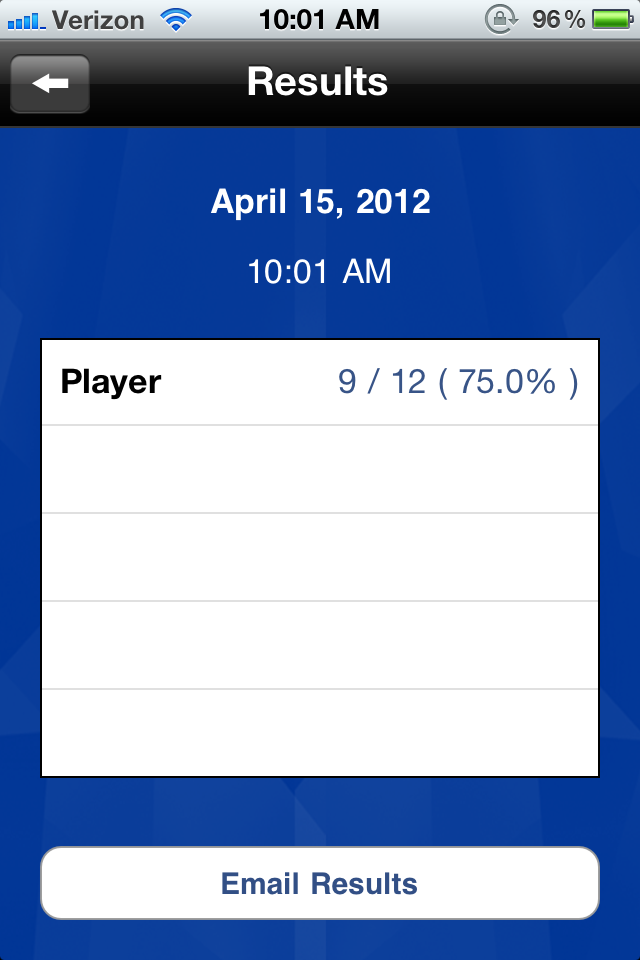
To start the task, you get one card at a time with the prompt "let's name things that...". The prompt is provided with audio, which I would recommend shutting off; just read the prompt yourself to make the task more suitable for adults. The screen for each prompt provides an illustration of the prompt (which, as expected, is on the childish side) and two buttons at the bottom: a red one and a green one, and each keeps count. The app keeps track of this count, and provides you with an overview of results at any point you choose to look at them from the menu (see "results" screen image below).

How we can use it in Tx: As noted above, this resource is targeted at schoolkids. As such, if using this app with an adult pt, I wouldn't bother showing the pt the screen or the the illustration, and instead just provide the verbal prompts myself (also remembering to shut the app's or my device's audio off) and use this application just for ideas of categories to ask about, and to easily count accuracy. The most straightforward use is to have pts name items within categories: I would ask for say, 3 items per category, and keep count using the buttons (green for each item that is appropriate, red for either an inappropriate item or a no-answer). Pretty much any simple reasoning/categorizing/naming task can be initiated with this list of categories, and I provide a couple such suggestions in the examples below.

I also believe that most tasks can be turned into memory tasks: when you are done with a specified number of cards, you can go back to the ones you covered and ask if the pt can remember the 3 (or however many) items they listed for each category.

Goals we can target in Tx with this app: Mostly reasoning and language goals such as organization and categorization (concrete and abstract), naming (divergent and convergent), and simple Y/N questions. And memory, always memory.

Some specific examples:

1. To target delayed memory goals, make this a recall of related items task: Deselect all but 5 cards. Go through all 5 asking the pt to name 3 items for each category, and letting them know that you'll ask later for these items again. When you've gone through all 5 cards (15 words), go back to the first one and see if pt can generate the same ones (from memory, or just from it being the same prompt; it's more functional than memorization of random lists). Use the scoring buttons to keep track of how many items were recalled (or re-generated to the same prompt).

2. Use the category prompts on the cards to generate your own list of items, say 3-5 items, and ask the pt to name the category. E.g., for the card that asks to name "things that are sweet" give the pt a list such as candy, ice cream, cookies, cake and sugar. Keep track of accuracy right on each card by selecting green if the pt got the category (or something close enough to it) and red if the pt wasn't able to name the category.

3. For a reasoning task, use the category suggestions on the cards to generate a list of items that belong to the specified category, and one that doesn't (e.g., for the "things that are sweet" category give candy, sugar, cake, ice cream, hamburger) and ask the pt to pick the "odd one out". Use the app to keep track of accuracy: Keep track of whether the pt was able to ID the odd item, and also whether they were able to explain why it didn't belong.

4. For a pt with simple Y/N question goals, use the prompts in this app is to generate such questions: Go through the categories and ask about the suitability of specific items, e.g., for the prompt "let's name things that are fruits" you can ask "is TV a fruit?" or "is watermelon a fruit?", etc. It's easy to come up with your own Y/N questions without this kind of app, but it's nice to have help generate them quickly AND keep track of accuracy.

It would surely be nice if this app allowed us to add or edit the cards... but even as is, it's not a bad little app to have on your phone (don't need a tablet for this as you won't be sharing the screen image with the pt) to help generate a few simple tasks quickly and keep track of accuracy.